Limits and compatibility
Jiggle Mode is a release candidate (1.0.0-rc.1). This page says plainly what has been checked on a real phone and what hasn't. It is updated as more devices are tested.
#What has been tested
On one iPhone Duo with iOS 27.2, folded, connected to a Mac with Apple silicon:
| Over the cable | Over Wi-Fi | |
|---|---|---|
| Reading the Home Screen, apps, icons | Tested | Tested, with the cable still attached |
| Rearranging (a two-app swap, and a full reorganization of about 140 changes) | Tested | Not yet tried |
| Undo (restoring a backup) | Tested | Not yet tried |
| Wi-Fi setup | Tested |
Each tested change ended with Done: the phone was read back and showed exactly what was asked for.
#Not tested yet
- Other iPhones. Expected to work. Not yet tried.
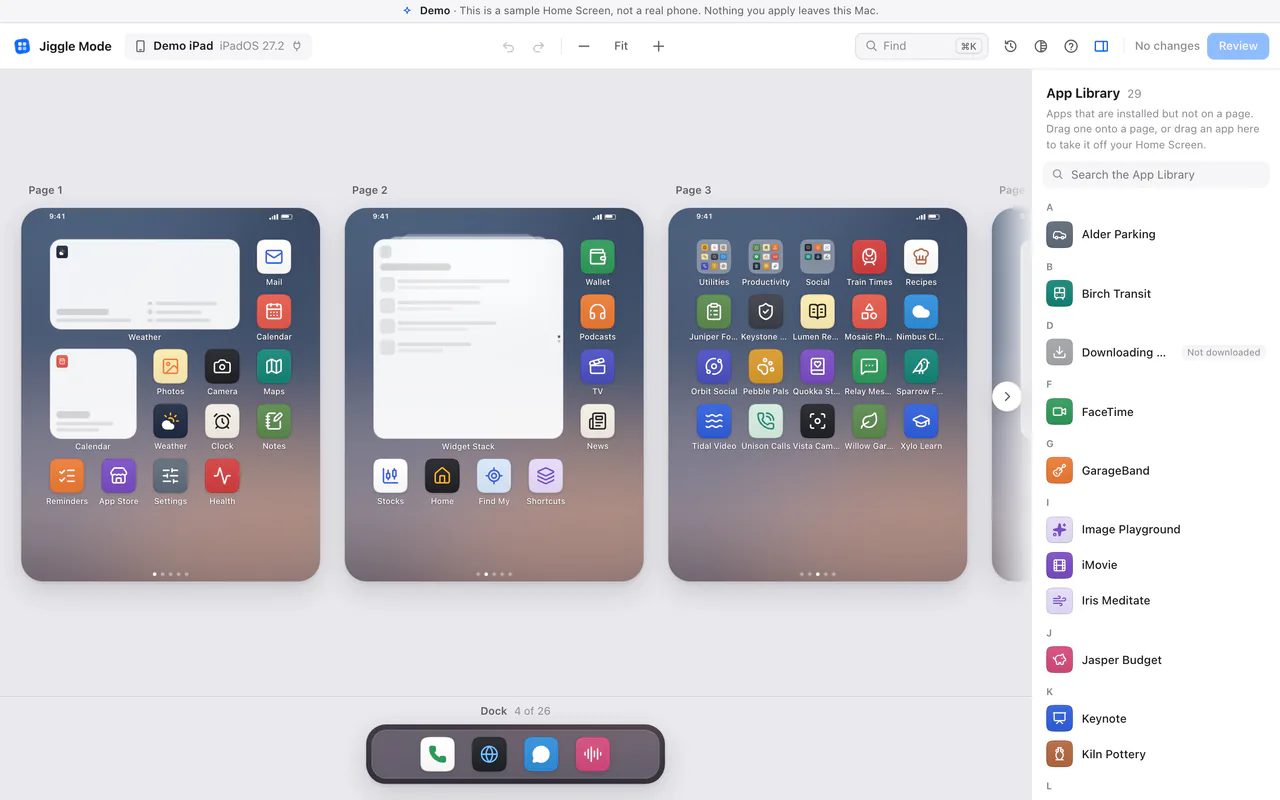
- iPad. Expected to work, and the editor draws an iPad's Home Screen grid (below, with the demo's pretend iPad). Not yet tried on a real iPad.
- Other iOS and iPadOS versions. Not yet tried.
- The iPhone Duo unfolded. Not yet tried.
- Reading without the cable attached, and changes over Wi-Fi. Not yet tried. Keep the cable in when you apply changes.
- A locked phone. It is expected to ignore changes (you'll see Your iPhone didn't take the changes). Not yet tried.
- Putting a change back on a real phone. The automatic put-back is tested against a simulated phone in Jiggle Mode's own tests, but no real phone has needed it yet.
- Widget sizes. Changing a widget's size hasn't been confirmed on a real phone. The review warns you, and if the phone doesn't keep the new size, your previous layout is put back.
- Widget stacks. A stack is expected to keep its top widget; on the test phone it did. It may show a different widget on top afterwards.
- Intel Macs. Jiggle Mode is built for both Apple silicon and Intel, but has only been run on Apple silicon so far.
- The confirmation window for agents, and the Claude Desktop extension's setting, haven't been tried on a real Mac session yet.
If you try Jiggle Mode on something not listed as tested, we'd like to hear how it went: hello@jigglemode.com.
#Requirements
- A Mac with macOS 11 Big Sur or later.
- An iPhone or iPad that is unlocked and trusts your Mac.
- A cable for the first connection. Wi-Fi after a one-time setup.
No jailbreak, no app on the phone, no account.
#What Jiggle Mode can't do
These are limits of what iOS lets a Mac do, as far as we know today.
- Add widgets. Widgets can be moved and removed, but not added. A removed widget can't be brought back from your Mac, not even by restoring a backup; add it again on the phone.
- Remove web clips. Safari web apps and website shortcuts can be moved, but only deleted on the phone.
- See empty gaps you left between icons. Applying a change closes them up, on every page.
- See hidden pages. Pages you hid on the phone aren't shown. Unhide them before a big rearrangement.
- Change a locked phone, or one that doesn't trust your Mac.
- Install or delete apps, or look inside them. Sending an app to the App Library only takes it off your Home Screen; it stays installed.
- Know which apps you use most. It can't see usage. Tell your agent, or arrange by hand.
- Ask a phone to trust your Mac over Wi-Fi. The first connection needs the cable.